
How to Play Aviator Online
Aviator is a crash game from SPRIBE in which a confirmed stake follows a rising multiplier. Bet adds the stake before takeoff. After the flight starts, the button changes to Cash Out and shows the amount available at the current coefficient. Cash Out completes the bet and adds the payout to the balance. If the flight ends before Cash Out completes, that bet produces no payout.
The payout is calculated as stake × Cash Out multiplier.
Aviator Game Rules
| Rule | Interface action | Result |
|---|---|---|
| A stake is set before takeoff | Enter an amount; press Bet | The stake joins the next round |
| The multiplier starts at 1.00x | Wait for the flight to begin | Cash Out becomes available |
| The payout grows with the multiplier | Watch Cash Out | The button shows the current return |
| Cash Out completes the bet | Press it during the flight | The payout enters the balance |
| A round can end at any multiplier | Press Cash Out before the end | Only completed bets produce a payout |
| Auto settings are optional | Open Auto before takeoff | The selected action runs automatically |
| Two panels can work together | Add the second panel | Each uses a separate stake and exit |
Aviator Interface Check
I opened Casino, pressed Search and entered Aviator. I selected the card connected to SPRIBE rather than another aircraft game. The guest screen then displayed Log in, Demo mode and a message confirming that the game can be used in demo mode.
After I selected Demo mode, the casino opened the embedded Aviator game window without requesting account details.
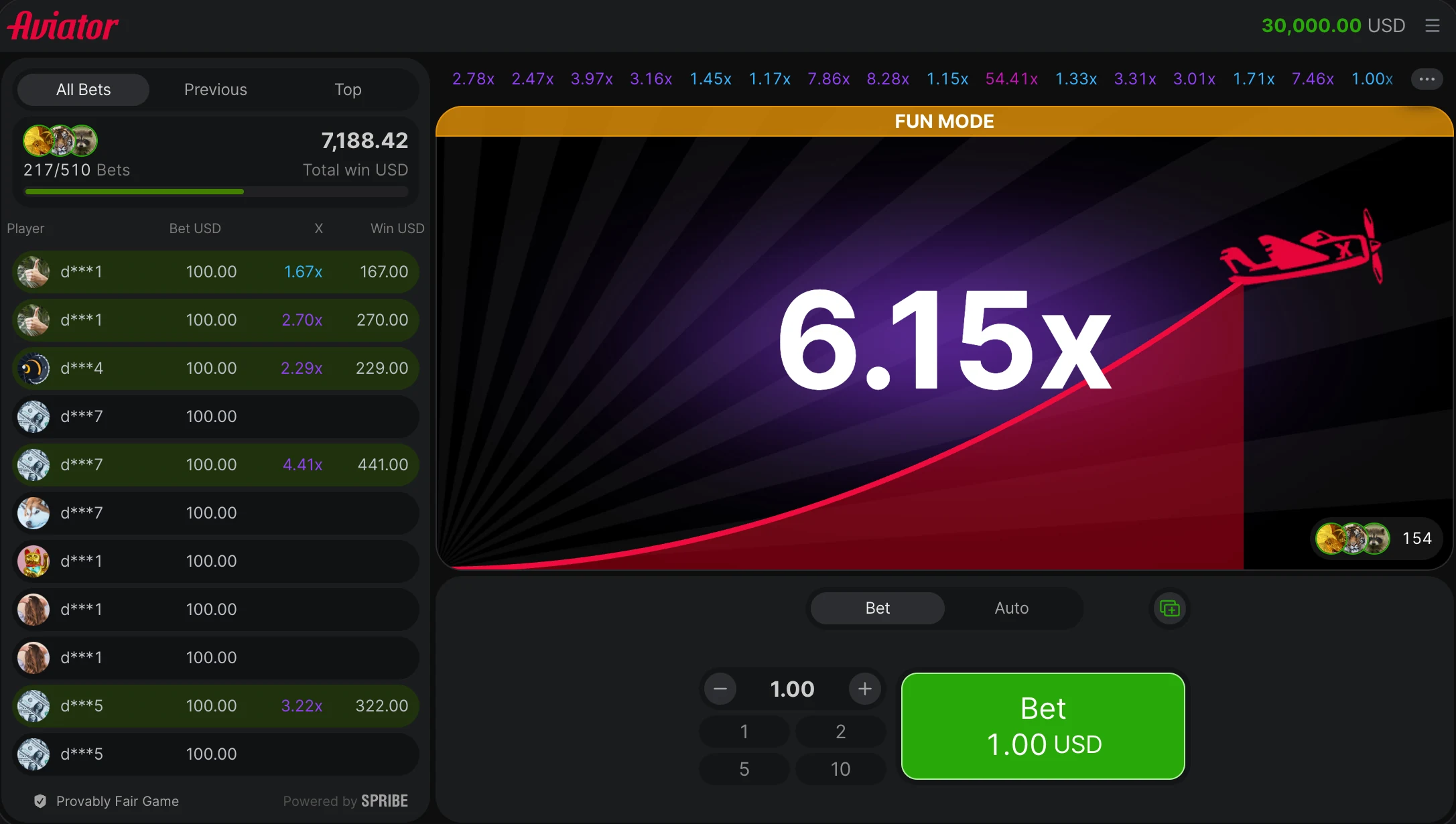
The desktop interface places All Bets, Previous and Top beside the multiplier graph. The betting area contains Bet, Auto, a stake field, amount controls and a button for a second panel. The lower-left corner identifies the provider as Powered by SPRIBE.
How to Open Aviator
- Open the online casino.
- Select Casino in the main navigation.
- Press Search and enter Aviator.
- Open the Aviator card that identifies SPRIBE.
- Select Demo mode for practice or use the existing Aviator login for an account session.
Before opening the game, I check the provider name on its card in the Aviator casino. SPRIBE on the card and inside the game identifies the original interface.
How to Play Aviator Step by Step
- Select one betting panel below the multiplier graph.
- Enter the stake or press one of the preset amount buttons.
- Keep the Bet tab selected for manual control, or open Auto and set the automatic actions.
- Press Bet before the next takeoff.
- Wait until the round starts and Bet changes to Cash Out.
- Watch the multiplier and the payout shown on the Cash Out button.
- Press Cash Out before the flight ends.
- Confirm that the completed amount has appeared in the balance and bet list.
After Cash Out is accepted, the payout is fixed at that coefficient. The flight may continue for other active bets, but the completed amount no longer changes.
Setting the Stake
The stake field controls how much is assigned to one betting panel. The minus and plus buttons adjust the displayed amount, while the preset buttons insert a shown value without typing it.
The amount is set before pressing Bet. Once Bet is confirmed, its value remains fixed for that flight.
| Stake | Cash Out multiplier | Completed payout |
|---|---|---|
| 50 BDT | 1.50x | 75 BDT |
| 100 BDT | 1.80x | 180 BDT |
| 200 BDT | 2.00x | 400 BDT |
The completed payout includes the original stake. A 100 BDT bet cashed out at 1.80x adds 180 BDT to the balance: 100 BDT returns as the stake and 80 BDT is the difference.
Using Bet and Cash Out
Before takeoff, the large green button shows Bet and the selected stake. Pressing it confirms participation in the next flight. If the current flight has already started, the stake waits for the next available round.
With an active bet, the button changes to Cash Out after launch. It displays the return available at the current multiplier. Pressing it completes the bet; the balance and the Win column then show the payout.
Cash Out is not shown when there is no active bet in the current flight. The next action is to enter a stake and press Bet before the following takeoff.
Manual and Auto Controls
Manual mode uses one press for Bet and another press for Cash Out. It keeps the exit decision on the main button throughout the flight.
The Auto tab prepares actions before takeoff. Auto Bet places the selected stake automatically, while Auto Cash Out completes an active bet when the flight reaches the selected coefficient.
Auto Cash Out creates a payout only when its coefficient is reached. If the flight ends below that value, no Cash Out is completed for that bet. The selected target remains an instruction to the interface rather than a prediction of the next result.
Two Betting Panels
The button beside the first panel adds a second set of stake, Bet and Auto controls. Each panel works independently, so both can join the same flight with different amounts and Cash Out settings.
Manual Cash Out can be used on the first panel and Auto Cash Out on the second. Before takeoff, the balance reflects both confirmed stakes. After the round, each panel records its own completed amount.
Aviator Demo Mode
Demo mode uses a practice balance and keeps the normal stake, Bet, Auto, multiplier and Cash Out controls. It allows the complete round sequence to be checked without using the account balance.
The demo screen lets the three button states be checked without an account stake: Bet before takeoff, Cash Out during an active flight and Bet again when the next stake can be prepared.

Playing Aviator on a Phone
The mobile layout uses the same sequence: set the stake, press Bet, watch the multiplier and use Cash Out. The betting panel moves below the flight area so the main controls remain visible in portrait orientation.
The Aviator app and mobile browser open the same casino account and SPRIBE card. Installation changes the access method, while the stake and Cash Out sequence remains the same.
Interface Statuses and Actions
| What appears on screen | What it means | Next action |
|---|---|---|
| Bet with a stake amount | No active bet is running | Press Bet before takeoff |
| Cash Out with a changing amount | The bet is active | Press Cash Out at the intended coefficient |
| Bet remains after launch | The current flight has no active bet | Prepare the next-round stake |
| Auto Cash Out does not complete | The flight ended below the selected value | Wait for the next Auto Bet or set a new target |
| Demo balance is displayed | Demo mode is active | Practise the round or return to Log in |
| Win amount appears in the bet list | Cash Out completed successfully | Check the updated balance |
FAQ
What do All Bets, Previous and Top show?
These tabs switch the bet records shown on the left side of the desktop interface. The visible columns identify the player, stake, completed multiplier and payout.
What do Bet, X and Win record?
Bet shows the stake, X records the completed Cash Out multiplier, and Win shows the payout added to the balance.
What do the preset amount buttons do?
They insert one of the displayed stake values without typing it. The preset buttons show 1, 2, 5 and 10.
Do recent multipliers change the next round?
No. The coefficients across the top record completed rounds; they do not alter the active multiplier or betting controls. An Aviator Predictor is a separate third-party tool rather than a function of the game history.
Can the next stake be prepared during a flight?
Yes. Changing the stake field does not alter the active bet; the new amount is prepared for a later round.
Where is the Provably Fair label?
The desktop interface displays Provably Fair Game in the lower-left corner beside the SPRIBE provider mark.